devel · product
The diary, the record and the till.
All on one screen.
Turnera is management software for businesses that work by appointment: clinics, beauty salons, physiotherapy, podiatry, veterinary practices, training centres, sports clubs and music, language or private-tutoring academies. Everything a front desk does in a day fits in three screens, and none of them makes you leave to take payment.
A day at the centre
Four moments, and that's it.
There are no modules to buy and no screens you discover six months later. A centre uses all of this from the first week.
Taking the booking
The day's diary by practitioner or by room, and a practitioner's week. Drag to move an appointment, stretch it to change the duration. It warns you if the slot clashes with another appointment for the same practitioner or the same room.
Seeing the client
The client record with their details, their notes, their session packs and everything that has been done for them. In clinics, their history too: previous conditions, open cases and how each session went.
Taking payment
A receipt with services and products, with a discount, a payment method and the change. If they use a session from a pack, it comes off there. And if they leave without paying, it is recorded as a debt instead of being lost.
Knowing how it's going
Eight reports — appointments, clients, payments, daily till, session packs, history, stock and stock movements — and all of them download to Excel. What's owed comes out sorted by age, which is how it hurts.
Screens
This is the application, unretouched.
Screenshots of a real installation with demonstration data. No sketches, no mockups.
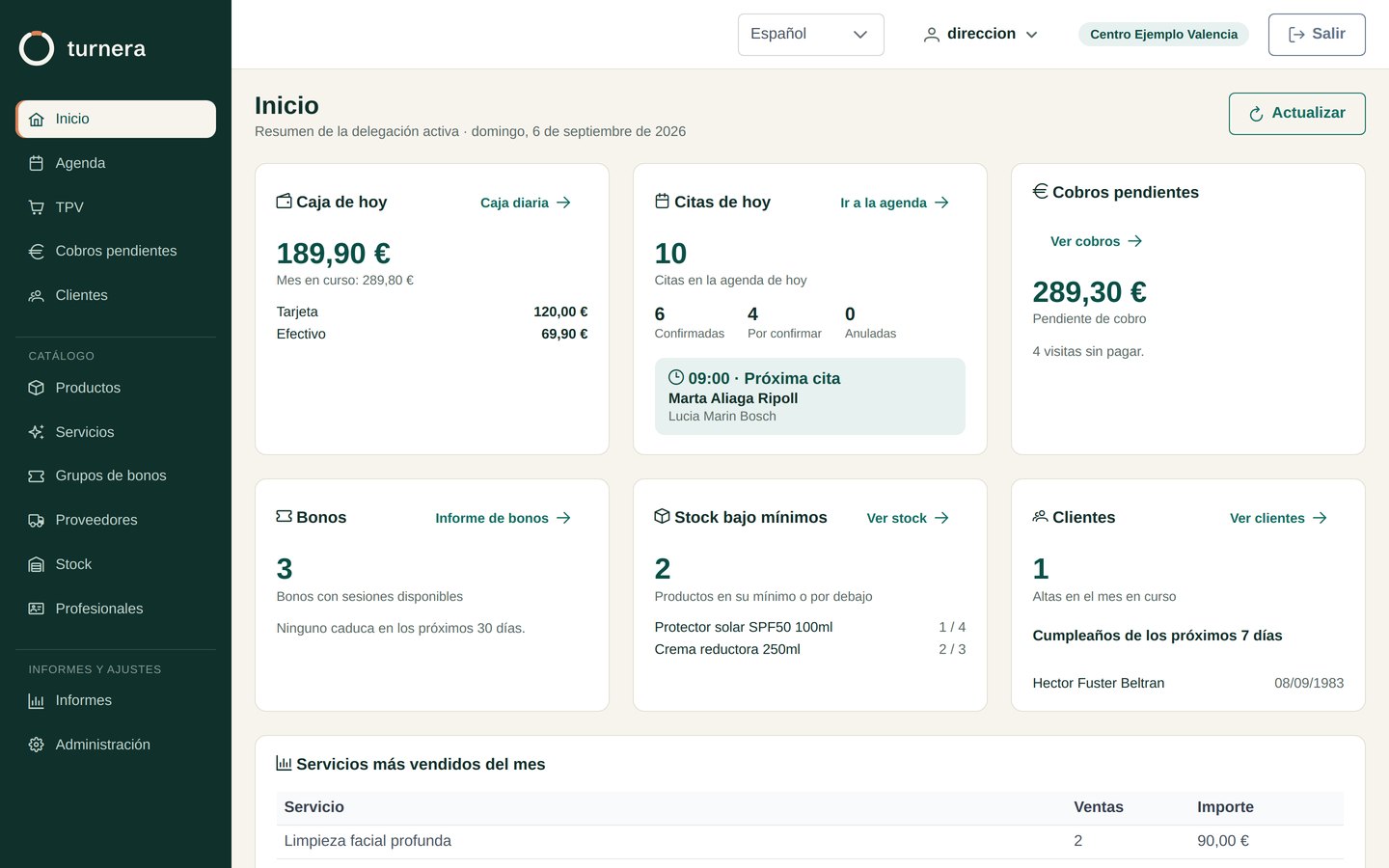
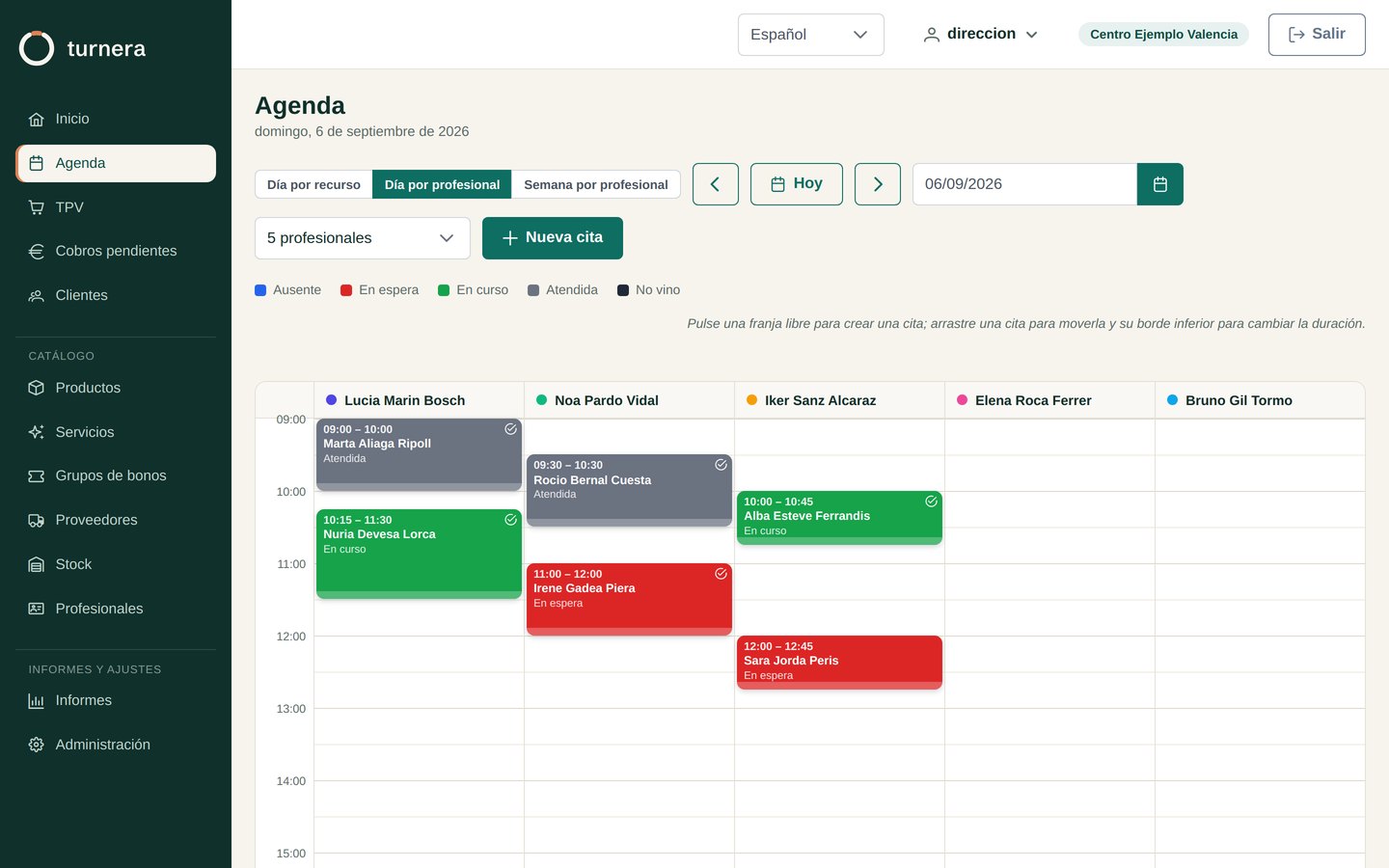
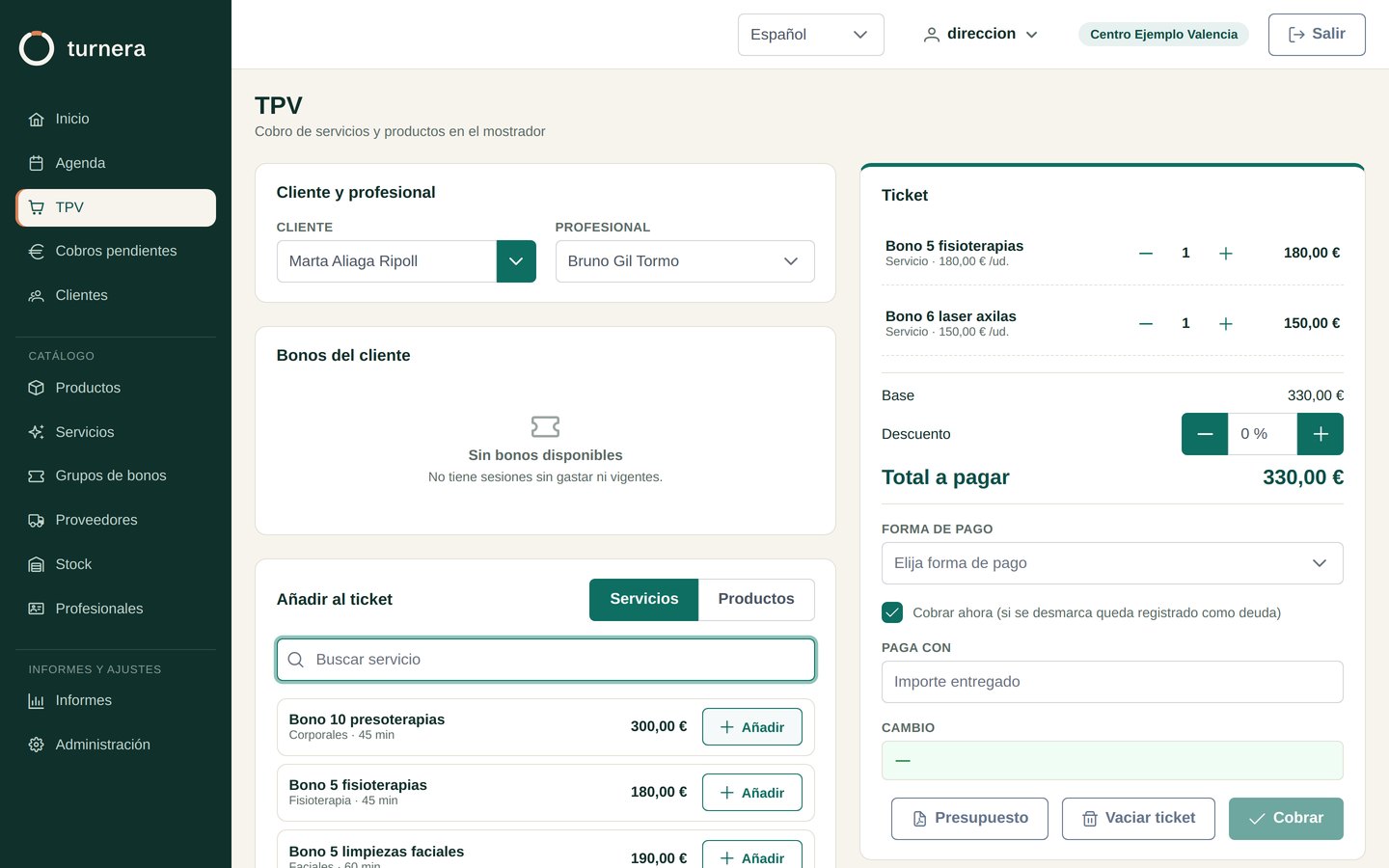
Videos
A tour of each module.
A short video per module, recorded on an installation with demo data. No sound: the subtitles follow the language of this page.
Core
Users and roles, preferences, branches and professionals.
Clients
Records, alerts, notes, history and the right to erasure.
Catalogue
Services, packages, vouchers, products, suppliers and stock.
Calendar
Appointments by professional or by resource, and how to book a new one.
Clinical records
Clinical cases, consents and who opens each record.
Till
Point of sale, pending payments, cash-up and gift cards.
Invoicing
Simplified and full invoices, invoice book and VeriFactu.
Portal and alerts
Online booking, WhatsApp reminders and integrations.
Staff
Clocking in, working-time record, work calendars and overtime.
Labour agreement and work calendar
Creating from scratch the agreement, shifts, public holidays and a professional's calendar.
Maintenance
Repair tickets with photos, history and an inspection link.
Each video only downloads when you press play, and uses no cookies. With the player's subtitles button you can switch language.
One product
The same application, set up your way.
It isn't several programs. It's a setting in the configuration and a few numbers in the catalogue: from there on the application speaks the way your centre speaks.
Clinic, beauty, physiotherapy
One person per room and an hour set aside for them. The record keeps their history, their allergies, the open case and how each session went, and the ten-treatment pack counts itself down as they come in.
This is where Turnera comes from: podiatry, veterinary, dental and physiotherapy all use the same thing.
How it's set up
- Activity: clinic.
- Resources: one room per space, capacity 1.
- Services: capacity 1.
- And also: clinical history and cases.
Personal trainer
One to one, and almost always on packs: ten sessions bought together and used over a couple of months. The client record carries their progress notes and their balance, so you can see at a glance how many sessions are left and when they expire.
If you work in several places, each room is a resource and the diary shows you the whole day at once.
How it's set up
- Activity: training.
- Resources: your room or the gym's, capacity 1.
- Services: capacity 1.
- And also: session packs with an expiry date.
Spinning, functional, yoga, pilates
The room has its places and the class has its own, and the smaller one wins: twenty bikes with a class of fifteen is fifteen. The class card shows 12 of 15 without opening it, and inside is the list of who's coming, who came and who didn't turn up.
The same client can't be in two classes that overlap, even if both have places left. And an installation that doesn't run group classes never finds out this exists: without touching anything, an appointment is one place.
How it's set up
- Activity: training.
- Resources: the room, with its places.
- Services: class capacity.
- And also: attendee list per class.
Padel or tennis club
The courts are the resources and the day is seen court by court. Casual hire, private lessons and groups of four live side by side, because what changes between them is a number in the catalogue and not a separate module.
And what you won't be paying: commission per booking. The fee is the fee, and your members are yours.
How it's set up
- Activity: training.
- Resources: one court each, capacity 4.
- Services: hire capacity 4, private lesson 1.
- And also: club vocabulary.
Music, language or tutoring academy
A private lesson is for one student and a group class has its places, each in its classroom, and the day is shown classroom by classroom or teacher by teacher. The student's record holds their lesson notes, their programme and their lesson voucher, and the front desk sees at a glance who has lessons left and who has something pending payment.
And the application speaks like an academy: students, teachers, classrooms and lessons, not patients or treatment rooms.
How it's set up
- Activity: academy.
- Resources: one classroom per classroom, with its places.
- Services: private lesson capacity 1, group with its capacity.
- And also: lesson notes and lesson vouchers.
Care homes, residents’ associations, workshops
If what you need is to look after your staff (clocking in, rota, work calendar and hours), Turnera can be set up without appointments or customers, with the Human Resources module and its own price per professional.
How it's set up
- Modules: Human Resources.
- Without: appointments, customers or till.
- And also: clocking in, rota and work calendar.
Your data
They're yours, and you can check that.
Your centre's data is not our hostage. It sits in an ordinary database, it comes out whenever you want and in a format somebody else can read: what ties you to Turnera has to be that it works for you, not what leaving would cost.
No commission per booking
You pay a fee and that's it. No percentage of what you charge, no marketplace in the middle: your clients are yours and we don't show them to anybody.
One installation per business
Each centre has its own database, separate from the rest. No client and no history ever crosses over into another.
And if you leave, you leave
Reports come out in Excel and the database is standard MySQL. Nobody is holding you back with the cost of getting out.
In your language
Spanish and English today; German, Portuguese and Chinese on the way. Everyone at the centre picks their own, and quotes and notices go out in the language of the client receiving them.
Pricing
You pay for what your agenda handles at the same time.
One fee based on your centre's resources, with everything included. No commissions, no users to count and no lock-in.
56 € a montha year
Paying the year in advance: 560 €, two months free.
672 € You save 112 €: you pay ten monthly fees instead of twelve.
More than 20 resources
Let's talk: write to us and we'll give you a price. Paying the year, two months free as well.
Prices exclude VAT. With annual payment you pay ten monthly fees instead of twelve.
See the full table
| Your centre | Per month | Per year | You save |
|---|---|---|---|
| 2 resources | 39 € | 390 € | 78 € |
| 3 resources | 48 € | 480 € | 96 € |
| 4 resources | 56 € | 560 € | 112 € |
| 5 resources | 63 € | 630 € | 126 € |
| 6 resources | 69 € | 690 € | 138 € |
| 7 resources | 75 € | 750 € | 150 € |
| 8 resources | 80 € | 800 € | 160 € |
| 9 resources | 85 € | 850 € | 170 € |
| 10 resources | 90 € | 900 € | 180 € |
| 15 resources | 115 € | 1.150 € | 230 € |
| 20 resources | 140 € | 1.400 € | 280 € |
| More than 20 | On request | On request | Two months |
What a resource is
Every slot in the agenda that can be busy at the same time: a room, a treatment box or a court. Three rooms working in parallel are three resources, however many staff you have. It does not matter how many premises they are in.
Everything included
Unlimited users and every feature, with no cut-down plans: agenda, records and clinical history, POS, vouchers, stock, reports, invoicing and whatever comes next. Technical support by email too. No booking commission and no percentage of what you charge.
Onboarding
Free if you start from scratch: we set up your centre with you. If we bring your data over from another program, 300 € once only. If another centre recommended you, the first month is free and the migration stays at €150.
No lock-in
Monthly, you cancel whenever you like. Yearly, if you leave early we refund what you haven't used, counting the months used at the monthly price. You pay by card or direct debit and the invoice arrives on its own.
Frequently asked questions
What people ask before deciding.
Answered straight: price, sign-up, how to bring your data across and what happens to it. If yours is missing, ask it in the form below and we'll add it here.
Price and billing
How much does it cost?
€39 a month with two resources included. Each extra resource costs a little less than the one before, and with ten you pay €90. From there, €5 for each extra resource up to twenty. Above twenty, let's talk. Prices exclude VAT, and if you pay the year in advance we give you two months free. Work out yours under Pricing.
What counts as a resource?
Every slot in your diary that can be occupied at the same time. If your centre can see three people at once, that's three resources.
- Two rooms worked in parallel are two resources. If two practitioners take turns in the same room and never overlap, it's one.
- Four bays with four physios at once are four, even if there are six people on the payroll.
- Six bookable courts are six. Coaches and whoever is on reception don't count.
Do you charge per user?
No. Users are unlimited at any size, and it isn't generosity: charging per user pushes people to share passwords, and in a program that stores clinical records you need to know who opened each file. One user per person is part of the system being serious.
And by the number of clients in my database?
Neither. That would be charging you for ten years of work, and on top of that it would push you to delete records the law obliges you to keep.
Do you take a percentage of what the centre bills?
No. Not of what you bill, not of each booking, not of each payment, and not of new clients who come in through the portal. Your clients are yours and what you charge is entirely yours.
What happens if I open a room or close a court?
Resources are counted on your renewal day, so there are no odd calculations mid-month: if you open a room on the 3rd, you start paying for it on your next fee. If you close one, the same the other way round.
On annual payment, if you grow during the year only the difference is billed for the months remaining.
Is there a sign-up fee?
No. If you start from scratch, onboarding is free: we set up your centre with you. You only pay if your data has to be brought over from another program: €300, once only, and we do the migration ourselves.
Another centre recommended Turnera to me. Is there anything in it for me?
Yes. If you sign up with the referral code of a centre that already uses Turnera, the first month is free. And if your data has to be brought over from another program, the migration costs you €150 instead of €300.
And the centre that recommended you earns one free month for every resource you contract, once you pay your first fee, up to twelve months a year. Every centre that uses Turnera has its code under the “Recommend Turnera” button, at the top, next to the language.
How do I pay?
By card or direct debit, monthly or yearly, and you receive your invoice automatically. No bank transfers to remember.
Is there a minimum term?
No. If you pay monthly, you cancel whenever you like: you keep access until the end of the month you've already paid for, and you're not charged again.
If you paid for the year up front and leave early, we refund what you haven't used, counting the months you did use at the monthly price. The two-month discount is what you pay for committing to a year, so it's lost if the year isn't completed; the money for the months you won't use goes back to your account.
With a centre at €56 a month: you pay €560 for the year and leave after three months. Those three months cost €168, so we refund you €392.
I have two centres. Do I pay twice?
No. The number of centres doesn't change the price: only the resources count, wherever they are. Two premises with three rooms each are a single installation of six resources, and you pay €69 a month, the same as one centre with six rooms under one roof.
Each branch has its own diary, its own till and its own reports, with management seeing it all together. Opening a second site doesn't cost you anything for the fact of opening it; it costs you if, by opening it, you can see more people at once, which is only fair.
Trial and sign-up
Can I try it before paying?
Thirty days, no card. You come in with sample data already loaded — clients, services, today's appointments — so you see how it behaves when full, not in front of an empty screen. When you start with real ones, they're deleted in one click.
Will a salesperson call me?
No. You try it on your own, with nobody chasing you.
But before you become a paying customer we do talk once, and on purpose: inside Turnera you're going to keep your patients' clinical records, and that makes us legally responsible alongside you. We want to know who we're signing up, and we want you to know who you're dealing with. It's one call, not a process.
How long until the centre is up and running?
The trial, minutes. With onboarding and no data to bring over, a couple of days. If you're migrating from another program, allow one to three weeks, almost all of it waiting for your current provider to hand over your data.
How do I cancel, if it comes to that?
From your account, with one button: no need to call anyone or send a letter. You keep access until the end of the period you've paid for, and your data isn't deleted at that point: you have 30 days to export all of it, and the day before that period runs out we email you a reminder. After the 30 days, it is removed from the server.
Bringing my data from another program
I'm on another program. Can you bring over what I have?
Yes, and it's the first thing we do. We bring over clients, services and prices, products, practitioners, session packs and pending sessions, appointments, completed visits and clinical history. Excel or CSV sheets are enough, which is what every program in the sector knows how to export.
What if something can't be brought over?
It always happens: there are fields that don't exist in the other program or are half filled. That's why, before touching anything we give you a report of what will come in, what is discarded and why, and which records look like duplicates. You review it, and only then is the real import done.
Do I have to close the centre on switchover day?
No. We bring your data over a couple of weeks beforehand, and on switchover day we bring only what has happened in between. You keep working in your program until the last day.
How much does the migration cost?
€300, once only, with onboarding included. If another centre recommended you, €150. There is no charge per record or per hour, and it doesn't matter how many years of data you bring.
My current program won't let me export. What do I do?
You have a right to your data even if your provider doesn't give you a button: it's the right to portability under Article 20 of the GDPR. You request it in writing and they are obliged to hand it over in a machine-readable format.
Ask for it before you cancel, not after. Several programs in the sector permanently delete data a few months after the service is cancelled, and their contract says so. First the data in your hands, then the cancellation.
Data, privacy and legal obligations
Who owns my data?
You, and it isn't a slogan. You can export all of it from the program whenever you like, without asking permission, without paying and without telling us.
Where is it hosted?
On servers inside the European Union. With clinical records inside, that isn't a technical preference: it's what saves you an awkward conversation if someone ever asks.
Do we sign anything about data protection?
Yes, and it's mandatory for both of us: a data processing agreement. You are the controller of your patients' data and we process it on your behalf. We give it to you signed when you start, together with what you need for your record of processing activities.
Can the person on reception see clinical records?
No, unless you expressly allow it. Turnera distinguishes four profiles — management, reception, practitioner and read-only — and the reception one doesn't include clinical data out of the box. You can grant it if it makes sense in your centre, but as your decision and not through carelessness on our part.
Can I find out who opened a patient's file?
Yes. Who opens each file, and when, is recorded, and the centre's management can look it up. It's your obligation as the controller of that data, so we'd rather hand it to you done.
Are there backups?
Daily, with a week of history and snapshots of the whole server. And they're tested by restoring them, because a backup that has never been restored isn't a backup: it's a folder.
Are you compliant with VeriFactu?
Yes. Turnera issues invoices as VeriFactu requires: every sale comes with its number, its QR code and its chained record, and none can be deleted or modified: corrections are made with a corrective invoice, as the rules demand. Automatic sending to the Spanish tax agency is switched on for each centre once it authorises us. Under the current timetable, companies are obliged from 1 January 2027 and self-employed professionals from 1 July 2027.
Can I give something to my accountant?
Yes. The payments, daily cash and movements reports come out in Excel or CSV, which any accountant can open, with payments split by method so the till matches the card terminal. And if you invoice with Turnera, the book of issued invoices, with its numbering, its VAT breakdown and the daily summary entry, comes out in Excel in one click.
Day to day
What's included in the price?
Everything. There are no plans with crippled features or modules bought separately: diary, client record, clinical history, point of sale and till closing, session packs and deferred payments, products and stock, reports and multiple branches. And whatever comes in next — the booking portal, WhatsApp reminders, the practitioner's app — comes in for everyone. What changes with size is the price, not what you can do.
Can appointment reminders go out by WhatsApp?
It's on the way, and it's the next thing in, because it reaches people where they actually read. Each plan will include a number of messages a month; if you send more, they're charged at what they cost us and itemised on your invoice. It's the only thing billed by usage, because it's the only thing with a real cost per message.
The reminder will carry your centre's name, the date and the time, and the patient will be able to reply to confirm or cancel. What it will never carry is the treatment: WhatsApp doesn't allow it, data protection law advises against it, and there's no way around it that ends well.
And by email?
By email, yes, from day one: appointment reminders and anything that isn't urgent go out that way, in the language of the client receiving them.
Can my clients book on their own?
Yes. Your centre has its own booking portal, at your Turnera address, where your clients see what is free, book and cancel. They sign in with their email, with no passwords to remember.
You set the rules in the preferences: how many days ahead can be booked, how much notice is needed, until when a booking can be cancelled, who can book without a voucher and whether someone with an outstanding debt can keep booking. You decide when to switch it on and which services and rooms are booked online.
Is there an app for the practitioner?
It's on the way: a slimmed-down version for the phone with what they have that day, their appointments and little else. Designed for someone who works on their feet and doesn't have a computer in front of them.
Does it work with my card terminal?
Turnera records the payment and the payment method, and the till report reconciles with whatever your terminal says. We don't handle the money: you collect it, into your account, with whatever payment gateway you already have.
Can I give my accountant access?
There's a read-only profile for billing and reports, with no access to anything clinical. If you'd rather not give an outsider access, you export and send it to them: for many centres that's the cleaner option.
Connecting with other software
Can Turnera connect to my ERP or accounting software?
Yes. Turnera has an integration API through which your ERP, or your accountant's, reads the catalogue, the clients, the sales and an accounting summary by day and VAT rate directly. No exporting by hand, no files sent by email.
The documentation is public, with examples, at devel.es/turnera/integradores. Whoever programs the connection finds everything they need there, without waiting for us to send anything.
And with a marketing or booking platform?
That too. A platform that brings you clients through its campaigns can check the free slots in your diary and book the appointment on the spot, with the same rules as your booking portal: the notice and the days ahead that you decide. If the front desk has taken that slot in the meantime, the platform is told and there are never two appointments at once.
Every appointment that comes in this way is marked with the platform it comes from, so you know how much each one brings you.
Is it safe? What can that software see?
Only what you give it. You set up each connection yourself, from Turnera's administration, and decide what it can read and whether it can book. It signs in with its own credentials, only from the addresses you authorise, and you switch it off whenever you want.
The clinical history never leaves through the API: it is not a permission that comes switched off, it simply does not exist.
Does it cost extra?
No. The API is included in the price, like everything else. Whatever the person programming the connection on your ERP or platform charges is up to them.
Help and support
If I get stuck, who do I turn to?
Us, by email, in Spanish and from Valencia, without going through a bot. And inside the program, the lifebuoy button on every screen sends us your incident with the screen you were on and the version you have, so you don't have to explain anything technical. The reply reaches you by email.
Is there a manual?
Yes, and it is open: you don't need to be a customer to read the manual, so you can take a look before deciding. It also opens from within the application and is updated with every version.
Is training included?
Training no, but technical support yes. If you have a question about how to do something, send us an email and we'll answer. And every screen is explained step by step in the manual.
I'm missing a feature. What do I do?
Tell us. Turnera is built out of what the centres using it ask for: if what you need can serve more people and isn't too particular to your business, we consider it for development and, when it goes in, it goes in for every customer at no extra cost.
What if a bug shows up?
You tell us and we fix it. Turnera is a living program, with new versions every so often, and improvements reach every customer at no cost and with no update for you to install.
Who we are
Are you a big company?
No, and it's worth knowing before you sign. We are a small team in Valencia, and that has two sides: when you write, someone who knows the program inside out will answer, and when you ask for something reasonable it can be done in weeks. On the other hand, we don't offer phone support or a 24-hour call centre.
What happens to my centre if something happens to you?
It's the right question. Your data exports in full whenever you want, without asking us, in a format other programs know how to import: if one day we're gone, you take it to another program. You're not tied to us still being here, and what ties you to Turnera has to be that it works for you, not what leaving would cost.
Why is it called Turnera?
From "turno", the Spanish word for a turn or a slot, which is what really organises a centre: who comes in, when, and with whom. Everything else — the record, the payment, the report — hangs off that.
Can't see your question? Ask it below and a person answers you, not a template. If it's a good question, it ends up on this page.
Prices exclude VAT. The VeriFactu dates are those of the calendar in force in September 2026 and depend on the regulations; check them with your accountant.
Demo
We'll show you and you tell us.
Tell us what kind of centre you have and what you're fighting with right now. We'll show you Turnera running with real data and we'll talk about whether it suits you. It's read by someone who knows the program from the inside, not by a salesperson.